Improved
Custom Data on Transactional Webhooks — Your Own References Back on Every Event
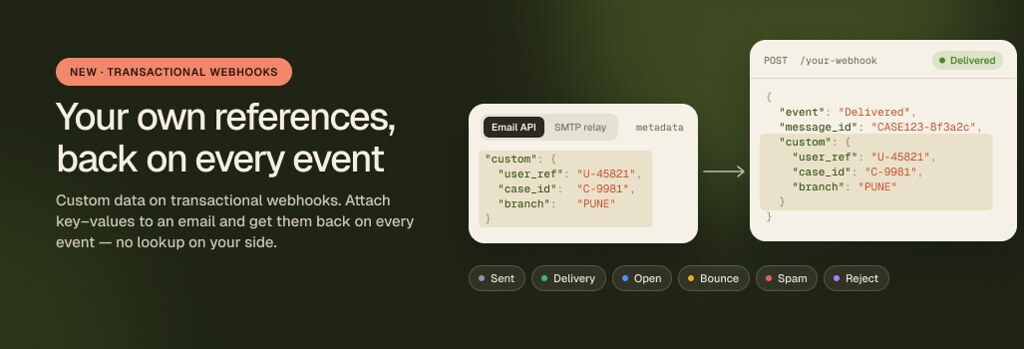
Read the guide: https://help.mailercloud.com/en/articles/221-webhooks-in-api-platform
Improved
Open Tracking Consent — Compliant Open Tracking for CNIL, Garante and EU ePrivacy Rules

Read the guide: https://help.mailercloud.com/en/articles/218-open-tracking-consent
Improved
Automation Conditions in Segments — Target Contacts by What They Did Inside an Automation

Find them under Audience → Segments → Create Segment → Choose filter → Automation.
See all segment conditions: https://help.mailercloud.com/en/articles/230-what-are-the-conditions-that-i-can-set-for-my-segment-lists
Preference Center — let subscribers choose what they receive

Set up Preference Center
Hosted on MeitY-Empanelled Infrastructure for India

Open Tracking Consent for GDPR & EU Compliance

You can now choose which contacts' email opens you track. Contacts who haven't given consent still get all your emails, and their opens still count in your campaign totals, but they aren't linked to their name. You can collect consent through signup forms, an opt-out link in your email footer, imports, the API, or by updating a contact yourself. To get started, go to Account › Preferences › Open tracking.
Email Marketing as a Service: A Dedicated Specialist Runs Your Campaigns

What's new
- A dedicated specialist who learns your brand, audience and goals, starting with a kickoff call
- End-to-end campaign management — setup, QA, scheduling and sending, with ongoing reviews as campaigns run
- A monthly report covering what was sent, how it performed, what we did and what's next
- Available on any plan, including Free — one subscription, monthly or yearly (save 20% yearly)
Why it matters
Most small teams know email works but never find the time to run it well. Campaigns slip, sends go out unchecked, and deliverability suffers. Email Marketing as a Service gives you an expert who does this every day, as a single point of contact, while your account works exactly as before.
Most small teams know email works but never find the time to run it well. Campaigns slip, sends go out unchecked, and deliverability suffers. Email Marketing as a Service gives you an expert who does this every day, as a single point of contact, while your account works exactly as before.
Suppression List: Bounces and Complaints Handled Automatically

Mailercloud now keeps a suppression list for your API sending. Hard bounces and spam complaints are added on their own, every future send to those addresses is rejected before it leaves the platform, and you can review, add to or export the full list whenever you need to.
What's new
- Hard bounces and spam complaints are suppressed automatically, with the mailbox provider's SMTP response saved against each address
- Add your own addresses manually or import a do-not-contact list from CSV or TXT — large files run in the background and you get an email when done
- Search, filter by reason or date, sort, and export the list to CSV
- Reactivate a recipient in one click, or manage everything through the API with your API key
Why it matters
Repeatedly emailing addresses that hard bounce or mark you as spam is one of the fastest ways to damage your sending domain's reputation. The suppression list stops that without any setup, keeps a record of why each address was blocked, and leaves you in control when a recipient asks to be re-added.
Find it under API platform → Suppressions.
Learn how to use the suppression list →
Repeatedly emailing addresses that hard bounce or mark you as spam is one of the fastest ways to damage your sending domain's reputation. The suppression list stops that without any setup, keeps a record of why each address was blocked, and leaves you in control when a recipient asks to be re-added.
Find it under API platform → Suppressions.
Learn how to use the suppression list →
Brand Kits: Import Your Brand in Seconds, Stay On-Brand Everywhere

Paste your website address and Mailercloud builds your brand kit for you — logo, colours, fonts, social links and footer details, saved once. From then on, every new email, webform and subscriber page starts on-brand.
What's new
- Build it from your website — or set it up by hand in a couple of minutes
- New emails open already branded — logo, colours and fonts in place from any layout or theme
- One switch brands your unsubscribe page, webforms and double opt-in email
- Up to 5 kits per account, live desktop and mobile preview, and your existing emails are never changed
Why it matters
Consistent branding is what makes subscribers recognise and trust your emails — and it usually costs you the same setup work on every campaign. Brand kits remove that repetition, so your team spends the time on the message instead of re-uploading the logo.
Set yours up under Account → Settings → Brand kit.
Learn how to set up your brand kit →
Consistent branding is what makes subscribers recognise and trust your emails — and it usually costs you the same setup work on every campaign. Brand kits remove that repetition, so your team spends the time on the message instead of re-uploading the logo.
Set yours up under Account → Settings → Brand kit.
Learn how to set up your brand kit →
Improved
The New Webform Builder Is Now Live — Describe Your Form and AI Builds It

Mailercloud now builds webforms for you — describe the form you want in plain language, and Mailercloud AI generates it in seconds: fields, copy, layout, and display rules.
What's new:
- Build with AI — type a description like "a pop-up newsletter signup collecting email and first name" and your form is ready to edit
- Import from URL — paste a link to any page with a form, and its fields are rebuilt automatically
- Redesigned builder — drag-and-drop fields, side-by-side rows, content blocks, and multi-step forms
- New field types — star rating, NPS scale, image choice, date picker, and hidden fields
- Smarter display rules — exit intent, scroll depth, frequency caps, plus device, URL, and country targeting
- Form analytics — views, submissions with conversion rate, and new contacts, in-app and via API
Available now on all plans. Go to Audience → Webforms → Create Form to try it, or read the full guide in our Help Center.
New
Custom Unsubscribe Pages & Reason Analytics Are Now Live

Mailercloud now lets you fully brand your unsubscribe page — and see exactly why contacts opt out — turning every unsubscribe into feedback you can act on.
Until now, anyone who clicked unsubscribe landed on a plain default page, and you never found out why they left. That changes today. You can customise the entire experience and read the reasons back as analytics.
Key highlights:
- Brand it your way — add your logo, brand name (fallback text), button colour, and your own heading and message.
- Ask why they're leaving — turn on a Departure Reason Survey with the reasons you choose.
- Success page with Resubscribe — show a branded confirmation and give contacts a one-click way back if they change their mind.
- Preview on any device — check desktop, mobile, and tablet before you publish.
- Reasons per campaign — open a campaign's report → Unsubscribes & Complaints for a full reason breakdown, plus a who-unsubscribed list you can export.
- Reasons account-wide — Audience → Summary shows the same breakdown across all your campaigns.
If "too many emails" keeps coming up, that's a signal to slow down. If "content isn't relevant" is climbing, you know what to fix. Real feedback, not guesswork.
You'll find it under Account Settings → Unsubscribe Page.
Learn More →
You'll find it under Account Settings → Unsubscribe Page.
Learn More →
Improved
Role-Based Access Control (RBAC) Is Now Live on Mailercloud

Key highlights:
- Five built-in roles — invite teammates as Owner, Admin, Manager, Analyst, or Viewer
- Fine-tuned permissions — tailor each user's access to match their responsibilities
- Request Access prompt — when a user attempts a restricted action, the owner receives a request to approve
- Safer collaboration — protect sensitive settings while letting your team work efficiently
This update makes it easier for growing teams and agencies to manage access securely across their Mailercloud account.
Try it: Account → Manage Users
Try it: Account → Manage Users
New
Sign in with Google & Microsoft Is Now Live

Key highlights:
- One-click sign-in — log in with Google or Microsoft, no password needed
- Dual login supported — already have a password? Keep using it, or set one anytime from Account → Security to use either method
- Works everywhere — available for new signups, existing accounts (auto-linked on a matching verified email), and team invites
This update makes signing in quicker and more convenient for you and your whole team.
Try it: Sign in at app.mailercloud.com
Try it: Sign in at app.mailercloud.com
Improved
More Visibility and Control on the API Platform Activity Page

Key highlights:
- Email content preview — view the sent message as HTML, plain text, or .eml directly from the activity log
- Filter by sender — narrow activity down to a specific sending address
- Filter by IP — see all activity from a particular sending IP
- Filter by recipient provider — isolate emails sent to Gmail, Outlook, Yahoo, and other providers
- Filter by source — separate activity by where it originated
These improvements make it easier to troubleshoot deliverability, verify what was sent, and audit your transactional and API email activity — all from one place.
Improved
Mailercloud for Zapier — More Actions, More Control

Key highlights:
- Create or Update Contact (Upsert) — add or update a contact in one step, no need for separate Zaps
- Delete Contact — remove contacts directly from Mailercloud via any connected app
- Add Tags to Contact — append one or more tags to a contact automatically
- Remove Tags From Contact — cleanly strip tags without affecting other contact data
- Create Tag — create new tags on the fly from within a Zap
- Update Tag — rename existing tags programmatically
- Create List, Update List, Delete List — full list management now available as Zap actions
- Date custom fields now auto-convert to the correct format — no more date errors
This update makes it easier than ever to keep your Mailercloud contacts, tags, and lists perfectly in sync with the rest of your tech stack.
Learn More →
Learn More →
New
Optimized Sending — Deliver Every Email at the Perfect Time

Key highlights:
- Each contact receives your email at their personal best hour, based on their historical open behaviour
- You choose the start time — Mailercloud handles the rest across a 24-hour window
- Contacts without engagement history are not skipped — they receive the email at the start of the window, just like a standard send
- The "Audience engagement by hour" chart lets you preview how your contacts are distributed before you send
- Works best for established audiences with sending history — ideal for re-engagement and regular campaigns
- Available on paid plans
Stop guessing the best time to send. Let Mailercloud optimise it for every contact, automatically.
Learn More →
Learn More →
Improved
New Automation Triggers for Advanced Email Workflows

Key highlights:
- Opened — trigger the next email when a contact opens a specific campaign or any campaign; send immediately or after a custom delay
- Not Opened — trigger a follow-up when a contact hasn't opened an email, with a default 1-day wait or a custom delay
- Clicked — trigger based on a link click in a specific campaign, any campaign, or a specific link within an email
- Not Clicked — trigger when a contact opens an email but doesn't click any links
- All — send the next email to all contacts regardless of their interaction
These triggers are available when building or editing advanced automation workflows under Automations → Create Automation → Advanced.
Learn More →
Learn More →
New
Dedicated IP for Your Email Sending

Key highlights:
- Full reputation control — your deliverability depends only on your own sending behaviour
- Isolated from shared senders — no other Mailercloud user shares your IP
- Purchase and manage Dedicated IPs directly from Billing & Usage → Add-ons
- IP goes through Setting up → Warming up → Active status automatically — no manual configuration needed
- Add multiple IPs, cancel individual IPs, or switch between billing cycles anytime
- Available at $50/month or $480/year (save 20%) per IP
- Recommended for accounts sending 100,000+ emails per month
This update gives high-volume senders complete control over their sender reputation and long-term deliverability.
Learn More →
Learn More →
New
Mailercloud MCP (Model Context Protocol) Is Now Live

Key highlights:
Manage contacts and lists — create, update, and delete through AI
Access campaign data and performance metrics via your AI assistant
Run pre-send audits and campaign analysis using AI commands
Connects securely using your Mailercloud API key
- Works with Claude, Claude Desktop, Cursor, and other MCP-compatible clients
This integration lets teams automate and manage their email marketing workflows entirely through AI.
Learn More → mailercloud.com/mcp
Learn More → mailercloud.com/mcp
New
Public API for Sender ID, Reply ID Listing & Test Email Send

Key highlights:
- List Sender IDs via API to retrieve all verified sender addresses in your account
- List Reply IDs to fetch configured reply-to addresses programmatically
- Send test emails using pre-saved test groups directly through the API
- Enables seamless integration with custom workflows and automation pipelines
This update makes it easier for technical teams to build and automate their email sending processes without relying on manual steps in the Mailercloud interface.
 Powered by FeedBear